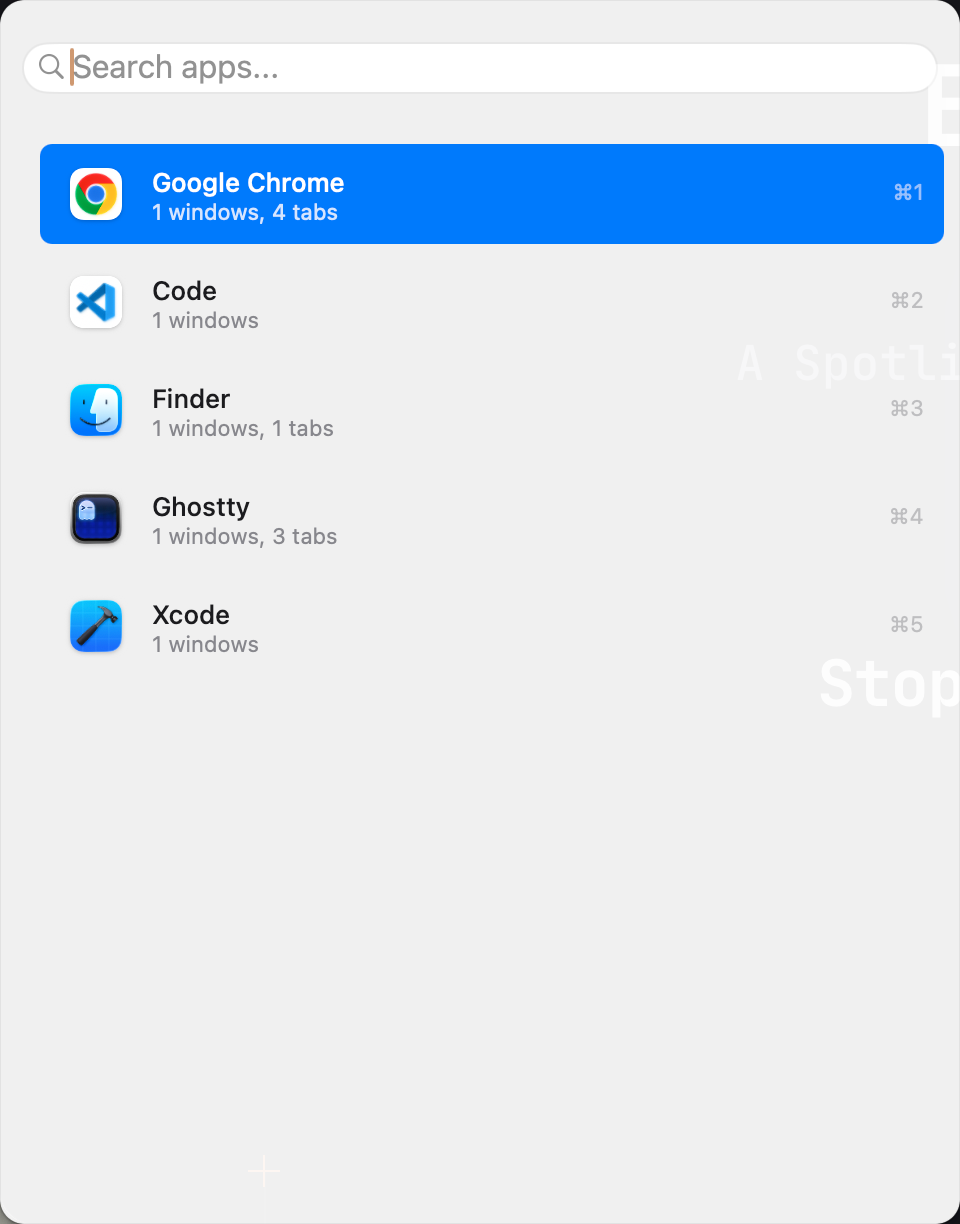
Introducing TabSwitch: Every Tab, One Shortcut
If you work with a browser, a terminal, and a dozen other apps open at once, you know the feeling: somewhere among forty tabs is the one you need, and finding it means clicking through windows, scanning tab strips, and losing your train of thought along the way.
TabSwitch is our answer to that problem. It is a lightweight menu bar app for macOS that gives every open tab and window a single, searchable home — summoned with one hotkey.
One Hotkey, Every Tab
Press Option+Space from anywhere (the shortcut is fully customizable) and a Spotlight-style overlay appears. Start typing, and TabSwitch fuzzy-matches against the titles and URLs of everything you have open. Hit Enter, and you are instantly switched to that exact tab or window — no matter which app it lives in.
Works Across Your Whole Workspace
TabSwitch reads open tabs natively from Google Chrome, Safari, Ghostty, and Terminal. For everything else, it falls back to native tab groups and system-wide window enumeration, so your entire workspace is covered by one search box.
And when the thing you need is not open yet, TabSwitch can search your installed applications too — press Enter to launch them directly. (You can turn this off in Settings if you prefer.)
Built to Stay Out of Your Way
- Fast by design — a background tab database and an adjustable search debounce keep results instant, even with hundreds of tabs.
- Yours to shape — overlay position, width, and maximum height are all adjustable, with light, dark, and system themes.
- Quiet — no Dock icon, no account, no clutter. It lives in the menu bar until you call it.
Private and Free
TabSwitch runs 100% locally. Tab titles and window data are processed on your Mac and never leave the device — there is no telemetry, no tracking, and no account system. The app asks only for the macOS permissions it genuinely needs: Accessibility (to read window titles and focus windows) and Automation/Apple Events (to query and activate browser tabs).
And it is completely free — every feature, every update, no in-app purchases and no subscriptions. Updates are delivered automatically via Sparkle.
Get Started
TabSwitch requires macOS 13 or later. Download it from the home page, grant the two permissions when prompted, and press Option+Space. Your tabs will never hide from you again.